The current-gen Xbox Series consoles, especially the Xbox Series X, are a performance beast. They offer the level of gaming experience one could only have dreamed of a decade ago. However, as modern-era games take advantage of all that power, gamers can easily run out of native storage space. With current-gen titles like Call of Duty, Starfield, Forza Horizon 5, and Microsoft Flight Simulatoryou’ll use up your built-in storage faster than you think.
The good news is that Microsoft allows you to expand Xbox storage quite conveniently. You can do this using an officially licensed storage expansion card or traditional external drives. Both methods have their pros and cons that you should keep in mind. Here’s everything you need to know about upgrading your Xbox Series X/S storage.
Upgrade Xbox Series X/S storage with a storage expansion card
A storage expansion card is the easiest and most intuitive way to expand the storage on your Xbox Series X/S. That’s because it’s a plug-and-play method. All you need to do is turn off your Xbox and plug the storage expansion card into the slot on the back. The slot is labeled Storage Expansion, meaning you can’t go wrong with it.
Turn on your Xbox and install any updates (if any are available). You should now have more storage space. The only problem is that there are only two officially licensed storage expansion cards: the WD Black C50 and another one from Seagate. They’re also expensive, but they offer the fastest possible loading times and work with all Xbox games.
Sale

WD Black C50 Storage Expansion Card
- The WD_BLACK C50 expansion card for Xbox takes advantage of the Xbox Velocity architecture and offers the same performance as its predecessor.
- As game file sizes increase, capacities from 512GB to 1TB* let you have more of today’s top titles installed and ready to go.
Sale
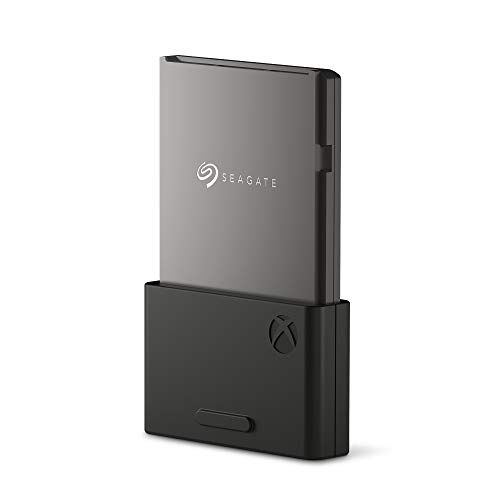
Seagate storage expansion card
- LAG-FREE GAMEPLAY Designed in collaboration with Xbox to seamlessly play Xbox Series X|S games from the internal SSD or…
- HIGHEST CAPACITY The only 2TB expansion card (and the highest capacity available) that maximizes the storage of Xbox Series X…
Upgrade Xbox Series X/S storage with an external drive
The Xbox Series X and S also support external drives as long as they support at least USB 3.0. This is a cheaper method, but it has some limitations. The first is the read and write speed, which will be slower than a storage expansion card.
The second limitation is that you can’t use an external drive to play games optimized for Xbox Series X and S. These games can only be stored on the drive, but will need to be moved to the console’s internal storage before you can play them. If you’re okay with these restrictions, here’s how you can use an external drive to upgrade your Xbox storage:
- Get the external drive you want to use to expand your Xbox storage.
- Plug it into one of the USB ports on the back of the console.
- If it’s a supported drive, Xbox will display a pop-up on the screen to let you know.
- Follow the on-screen instructions to complete the storage installation process.
- Visit Settings > System > Storage devices to check if the storage is installed correctly. This menu can also be used to change the preferred game installation location.
Please note that the process may require you to format the drive before you can begin using it. For this reason, it is recommended that you back up any data you have on the drive before using it as external storage for Xbox.
If you have any questions or doubts, feel free to ask in the comments section below.
Note: This article may contain affiliate links that help support our authors and keep Phandroid servers running..